MIUI Secret Album vs Samsung Secure Folder vs Google Private Space vs Huawei: Security Showdown
We compare the encryption behind four Android private storage features — MIUI Secret Album, Samsung Secure Folder, Google Private Space, and Huawei Hidden Album. See which is secure and which is just hiding.
February 20, 2026 • 10:00 AM UTC12 min read2,800 wordsBy MIUI Decrypt Team
Loading article…
About the author
MIUI Decrypt Team publishes practical guidance for MIUI Secret Album recovery, Xiaomi privacy, and .lsa/.lsav troubleshooting so users can make informed decisions before they upload.
Every blog article is designed to match the product experience: clear explanations, realistic recovery expectations, and a direct path back to the decrypt workflow.
Related articles
Explore more MIUI Gallery recovery guides from the LSA Decrypt team.
MIUI Secret Album vs Samsung Secure Folder vs Google Private Space vs Huawei: Security Showdown
We compare the encryption behind four Android private storage features — MIUI Secret Album, Samsung Secure Folder, Google Private Space, and Huawei Hidden Album. See which is secure and which is just hiding.
February 20, 2026 • 10:00 AM UTC12 min read2,800 wordsBy MIUI Decrypt Team
MIUI Decrypt illustration: comparing how MIUI Secret Album, Samsung Secure Folder, Google Private Space, and Huawei PrivateSpace handle encryption under the hood.
Every major Android manufacturer now offers a private storage feature — a place where photos, videos, and files stay hidden behind an extra lock screen. MIUI calls it Secret Album, Samsung has Secure Folder, Google introduced Private Space in Android 15 [8], and Huawei offers both a Hidden Album and PrivateSpace. They all promise the same thing: your files, safe from anyone who picks up your phone.
But look under the hood and the differences are radical. One uses a static key baked into the app [3][4]. Another stores keys in a hardware security module certified for government use [6]. And one of them doesn't really encrypt at all [9]. This article puts all four side by side — algorithm, key storage, hardware backing, and what each means for your privacy.
The contenders
Before diving into the comparison, here is what each feature actually is:
MIUI Secret Album
An album-level lock in MIUI Gallery on all Xiaomi, Redmi, and POCO devices. Files stored in Secret Album are encrypted and saved as .lsa (photo) or .lsav (video) containers on the filesystem. The encryption scheme is AES-128-CTR [1][2] with a static key derived from the MIUI Gallery APK certificate [3][4] — no user credentials, no TEE, no authentication tag. The full binary layout is documented in our LSA/LSAV file format guide[10].
Samsung Secure Folder
A Knox-protected container on Galaxy devices. All files are encrypted with AES-256-XTS at the SoC level (Qualcomm ICE or Exynos FMP), and file encryption keys (FEKs) are wrapped with AES-256-GCM inside the Samsung TEE [5]. Keys are derived from the user's lock screen credentials and never leave the secure world. Secure Folder is part of Samsung Knox, which holds NIAP Common Criteria certification for government use [6]. Files cannot be decrypted without the original device and credentials.
Google Private Space
Introduced in Android 15 [8], Private Space creates a separate credential-encrypted (CE) profile on the device. It uses Android's File-Based Encryption (FBE) with AES-256-XTS, key management via Keymaster and Gatekeeper in the TEE, and a synthetic password mechanism that ties the encryption key to the user's lock screen [7]. Private Space works on any Android 15 device with hardware-backed key storage, but the actual security depends on the SoC vendor's TEE implementation.
Huawei Hidden Album / PrivateSpace
Two separate features. Hidden Album in EMUI Gallery simply removes photos from the main gallery view — they stay unencrypted on the filesystem [9]. PrivateSpace is a separate user profile with FBE, similar to Android's multi-user feature, and uses Huawei's TrustedCore TEE on Kirin devices. However, academic research (USENIX WOOT'20) uncovered critical vulnerabilities in TrustedCore's keystore, including leakage of export-protected keys [9]. Hidden Album is not encryption; PrivateSpace is encryption with an unproven TEE.
Encryption comparison at a glance
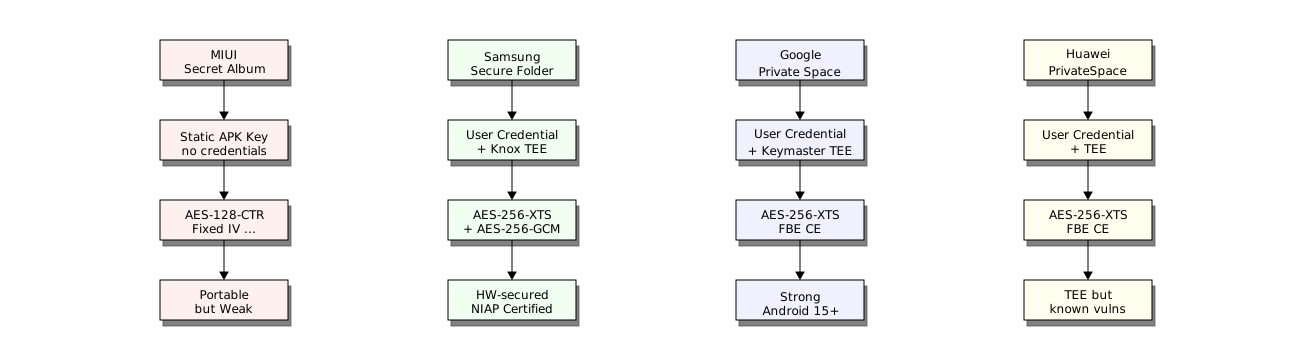
The diagram below shows the key derivation and encryption flow for each implementation. The critical difference is where the key comes from — this determines whether your files survive device loss, and how hard they are to crack.
Key derivation and encryption flow for each implementation. MIUI is the only one where keys are device-independent. Samsung is the only one with NIAP certification.
The most important takeaway is the portability trade-off. MIUI Secret Album is the only implementation where encrypted files can be decrypted without the original device. That is a genuine advantage for recovery — if you wipe your Xiaomi phone or lose it, you can still recover your photos using a tool like MIUI Decrypt. But that portability comes from a static encryption key embedded in the MIUI Gallery APK [3][4]. Anyone with access to your .lsa or .lsav files and the APK can decrypt them, regardless of your lock screen password.
Samsung, Google, and Huawei bind their encryption keys to your lock screen credentials through a hardware Trusted Execution Environment [5][7][9]. This means even if someone steals your phone and dumps the storage, they cannot decrypt Secure Folder or Private Space files without your PIN. The trade-off is that if you forget your PIN or the device dies, the files are gone — no recovery path exists.
There is another layer worth noting: the gap between marketing and implementation. Xiaomi markets Secret Album as "encrypted storage", which is technically true — the files are encrypted. But the scheme (AES-128-CTR, static key, no authentication) [1][2][3][4] does not match the "military-grade protection" imagery that often accompanies such features. Samsung's Knox actually holds military-grade certification (NIAP Common Criteria) [6]. Huawei's Hidden Album, meanwhile, is just hiding — not encryption — despite appearing alongside encryption features in the Settings menu [9].
Security verdict
Ranked from strongest to weakest protection for an average user:
Samsung Secure Folder (9/10). Hardware-backed with NIAP certification [6], dual-layer AES-256 encryption, and TEE-protected keys [5]. The only implementation suitable for classified or enterprise data. The downside: no offline recovery path if you lose access to your device.
Google Private Space (8/10). Strong Android-native FBE with Keymaster TEE [7]. Security depends on the device vendor's TEE implementation — a Pixel with Titan M2 is more secure than a budget phone with a software-backed keystore. Available only on Android 15+ [8].
Huawei PrivateSpace (5/10). Technically similar to Google's FBE, but the TrustedCore TEE has known critical vulnerabilities documented in peer-reviewed security research (Busch et al., USENIX WOOT'20) [9]. Not recommended for sensitive data on older devices.
MIUI Secret Album (2/10 for security, 10/10 for recovery). Cryptographically the weakest — static key, no authentication, no TEE [1][2][3][4]. But uniquely, it is the only implementation where you can recover files after device loss. Choose based on your priority: security or recoverability.
Which one should you use?
The right answer depends entirely on what you are protecting against:
You want to recover files after a factory reset or lost phone. MIUI Secret Album is the only option that supports this — precisely because of the static key [3][4]. If you use a Xiaomi device, do not migrate your private files to a third-party vault app, or you will lose the recovery property.
You need maximum security — corporate data, legal documents, medical records. Samsung Secure Folder is the clear winner. NIAP Common Criteria certification means it has been evaluated against government-grade attack scenarios, including physical extraction and side-channel attacks [6].
You are already in the Google ecosystem with a Pixel or high-end device. Private Space is a solid, well-architected solution [7][8]. Just be aware that on devices without a dedicated security chip, the TEE protection is weaker.
You use a Huawei device and need real encryption. Use PrivateSpace, not Hidden Album. Hidden Album only hides files from the gallery view — the files remain unencrypted on disk and are accessible via any file manager or USB connection [9].
If you are migrating from a Xiaomi device to another brand and need to recover existing Secret Album files, see our recovery walkthrough[11] for the complete workflow. You can also view your decrypted LSA file directly in the browser to verify the content before migrating.
ObikBobik, miui-cloud-decryptor: Xiaomi gallery hidden files decryptor (.lsa/.lsav), GitHub repository. https://github.com/ObikBobik/miui-cloud-decryptor Independent reverse engineering confirming AES-128-CTR with a hardcoded 16-byte IV and the first 16 bytes of the MIUI Gallery APK certificate as the encryption key.
Dennis Kabui, Decrypting MIUI Cloud files, October 2025. https://blog.denniskabui.com/decrypting-miui-cloud/ Technical analysis of the AES-128-CTR implementation used by MIUI Secret Album, including counter reconstruction from the fixed IV and partial video header encryption.
Samsung Knox, Knox Platform — NIAP Common Criteria Certification. https://www.samsungknox.com/en/knox-platform Samsung Knox has been validated against the NIAP Common Criteria (CC) Protection Profile for Mobile Device Fundamentals, making it certified for use in government and defense environments.
Android Open Source Project, File-Based Encryption. https://source.android.com/docs/security/features/encryption/file-based Official documentation of Android FBE: AES-256-XTS for file contents, AES-256-CBC-CTS for file names, key derivation via Keymaster and Gatekeeper HALs, and credential-encrypted (CE) storage.
Android Open Source Project, Private Space, Android 15 feature documentation. https://source.android.com/docs/security/features/private-space Official documentation of Android 15 Private Space: separate credential-encrypted profile, dedicated user ID, and isolated storage backed by Android FBE.
Busch, M., Westphal, M., Müller, T., Unearthing the TrustedCore: A Critical Review on Huawei's Trusted Execution Environment, USENIX WOOT'20. https://dl.acm.org/doi/10.5555/3488877.3488881 Peer-reviewed security analysis uncovering critical vulnerabilities in Huawei's TrustedCore TEE, including leakage of export-protected keys, inadequate memory isolation, and weak key storage. Confirms that Huawei's Hidden Album lacks encryption entirely.
MIUI Decrypt, LSA/LSAV File Format Guide, lsadecrypt.online. https://lsadecrypt.online/en/blog/lsa-lsav-file-format-guide Technical reference documenting the byte-level layout of .lsa and .lsav containers, the filename convention with MD5 key fingerprint, and the AES-128-CTR decryption parameters.
MIUI Decrypt, How to Recover MIUI Gallery Photos, lsadecrypt.online. https://lsadecrypt.online/en/blog/how-to-recover-miui-gallery-photos Step-by-step recovery walkthrough for exporting and decrypting MIUI Secret Album files, including ADB extraction, file transfer, and decryption via web tool.
About the author
MIUI Decrypt Team publishes practical guidance for MIUI Secret Album recovery, Xiaomi privacy, and .lsa/.lsav troubleshooting so users can make informed decisions before they upload.
Every blog article is designed to match the product experience: clear explanations, realistic recovery expectations, and a direct path back to the decrypt workflow.
Related articles
Explore more MIUI Gallery recovery guides from the LSA Decrypt team.