Decrypt MIUI Gallery Files with AI Agents Using MCP Protocol
MIUI Decrypt now supports the Model Context Protocol (MCP), letting AI agents decrypt .lsa and .lsav files autonomously. Use Claude Desktop, Cursor, OpenCode, or any MCP-compatible client to integrate file recovery into your AI workflow.
MIUI Decrypt Team publishes practical guidance for MIUI Secret Album recovery, Xiaomi privacy, and .lsa/.lsav troubleshooting so users can make informed decisions before they upload.
Every blog article is designed to match the product experience: clear explanations, realistic recovery expectations, and a direct path back to the decrypt workflow.
Related articles
Explore more MIUI Gallery recovery guides from the LSA Decrypt team.
Decrypt MIUI Gallery Files with AI Agents Using MCP Protocol
MIUI Decrypt now supports the Model Context Protocol (MCP), letting AI agents decrypt .lsa and .lsav files autonomously. Use Claude Desktop, Cursor, OpenCode, or any MCP-compatible client to integrate file recovery into your AI workflow.
MIUI Decrypt illustration: an AI agent autonomously decrypting MIUI Secret Album files through the Model Context Protocol.
You have a folder full of encrypted .lsa and .lsav files from your Xiaomi device. Normally, you would open a browser, drag each file, and wait for the web interface to process them one by one. But what if your AI assistant could do all of that for you — fetch the file, decrypt it, show you the preview, and even help you purchase the original quality — all from the comfort of your terminal, IDE, or chat window?
That is exactly what the Model Context Protocol integration brings to MIUI Decrypt. Whether you prefer Claude Desktop, Cursor, OpenCode, or any MCP-compatible AI tool, you can now delegate file recovery to an agent that works the way you do.
Why MCP for file decryption
Decrypting MIUI Secret Album files involves several steps: getting an upload URL, uploading to temporary storage, starting the decryption job, polling for status, and retrieving the result. For a human, this means clicking through a web UI. For an AI agent with MCP tools, it is a scripted sequence that runs automatically while you work on something else.
The real value kicks in during recovery sessions with dozens of files. Instead of manually managing each one, you tell your agent: “decrypt every .lsav file in this folder and save the previews” — and the agent figures out the order, handles errors, and reports back when done.
What is Model Context Protocol
The Model Context Protocol is an open standard developed by Anthropic that defines how AI models connect to external tools and data sources. Instead of building custom integrations for every tool, developers expose functionality once through MCP — and any compatible AI client can discover and invoke those tools automatically.
Think of it as a universal USB-C for AI agents: one protocol, many devices. Your AI assistant can query databases, browse files, control applications, and — with MIUI Decrypt — recover encrypted media from your Xiaomi phone. The protocol handles authentication, tool discovery, and structured data exchange, so you focus on the task, not the plumbing.
Two ways to integrate
MIUI Decrypt exposes its MCP tools through two complementary channels, so you can pick the one that fits your workflow:
Remote MCP server for desktop tools
A full-featured MCP server runs at https://mcp.lsadecrypt.online/mcp using the StreamableHTTP transport. This is the recommended path for desktop AI clients like Claude Desktop, Cursor, OpenCode, and custom scripts.
The remote server handles authentication with OAuth 2.0 and PKCE, manages per-session state, and supports local file streaming for faster uploads. It is registered in the official MCP Registry at registry.modelcontextprotocol.io and listed on Smithery for one-click installation.
Setup takes seconds: point your AI client to the server URL, authenticate via OAuth, and the tools appear in your agent’s toolbox. Full documentation and connection guides are available at mcp.lsadecrypt.online.
WebMCP for browser-based AI
For AI assistants that run inside the browser — such as Chrome’s built-in Gemini integration — MIUI Decrypt also registers tools directly through the browser’s native Prompt API (navigator.modelContext).
This feature, called WebMCP, activates automatically when you visit the MIUI Decrypt website. No setup, no OAuth, no configuration — the tools appear in your browser’s AI panel as soon as the page loads. The AI assistant uses your existing browser session, so authentication is handled transparently.
WebMCP covers the core decryption workflow: uploading files, monitoring progress, viewing previews, checking pricing, and creating checkout sessions. It is perfect for quick, interactive recovery sessions where you want to talk to your AI assistant directly on the same page where your files live.
Example: AI agent decrypts a file
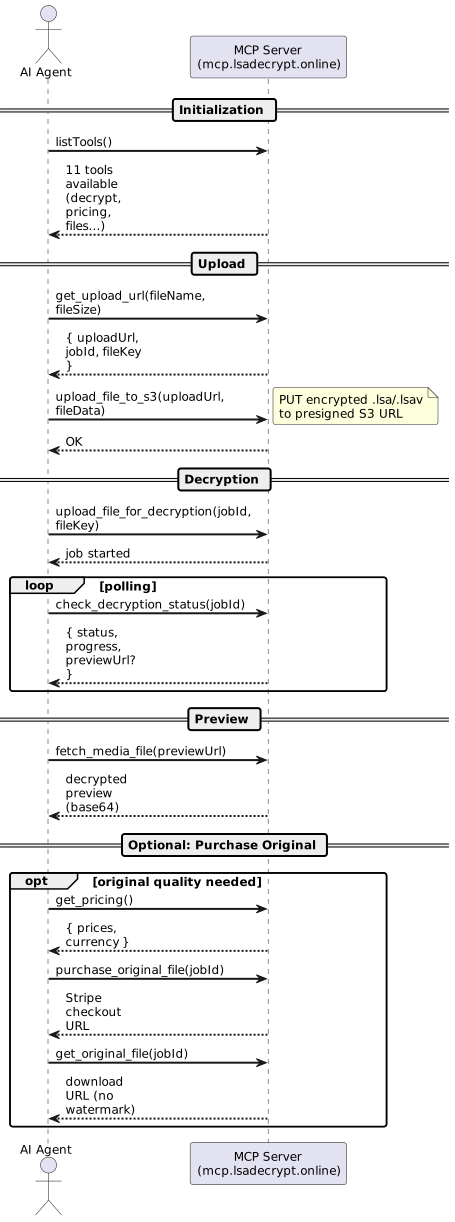
Here is what happens under the hood when you ask your AI agent to decrypt an encrypted .lsa photo:
End-to-end workflow: the AI agent handles upload, polling, retrieval, and optional purchase — all through MCP tool calls.
The agent requests an upload URL and receives a presigned S3 link.
The encrypted file is streamed to temporary storage.
The agent starts the decryption job and begins polling for progress.
Once complete, the agent fetches the preview image and displays it to you.
If you want the original quality without watermark, the agent creates a checkout session with a single call.
The entire sequence is a handful of tool invocations that take seconds to execute. You never touch a browser tab. The agent handles retries, error reporting, and progress feedback — treating file recovery as just another task in its pipeline.
Where to find it
The MIUI Decrypt MCP integration is available in three places:
Server documentation — mcp.lsadecrypt.online (full tool reference, connection guides, and examples)
All three entry points lead to the same server. Pick whichever matches your client’s installation flow.
Get started
MCP integration makes MIUI file recovery a programmable operation. Whether you are a developer automating a recovery pipeline, a power user who prefers the terminal, or someone who wants their AI assistant to handle the tedious parts — the tools are ready.
Head to mcp.lsadecrypt.online for the full reference, or visit the Decrypt & Recover page and let WebMCP activate your browser’s AI assistant automatically. Your .lsa and .lsav files are one prompt away from being recovered.
About the author
MIUI Decrypt Team publishes practical guidance for MIUI Secret Album recovery, Xiaomi privacy, and .lsa/.lsav troubleshooting so users can make informed decisions before they upload.
Every blog article is designed to match the product experience: clear explanations, realistic recovery expectations, and a direct path back to the decrypt workflow.
Related articles
Explore more MIUI Gallery recovery guides from the LSA Decrypt team.