MIUI Decrypt Support publishes practical guidance for MIUI Secret Album recovery, Xiaomi privacy, and .lsa/.lsav troubleshooting so users can make informed decisions before they upload.
Every blog article is designed to match the product experience: clear explanations, realistic recovery expectations, and a direct path back to the decrypt workflow.
Related articles
Explore more MIUI Gallery recovery guides from the LSA Decrypt team.
Upload your Secret Album file and follow the recovery wizard
Our service validates metadata automatically, shows the AES decryption steps in real time, and streams your decrypted photos securely to a downloadable ZIP archive.
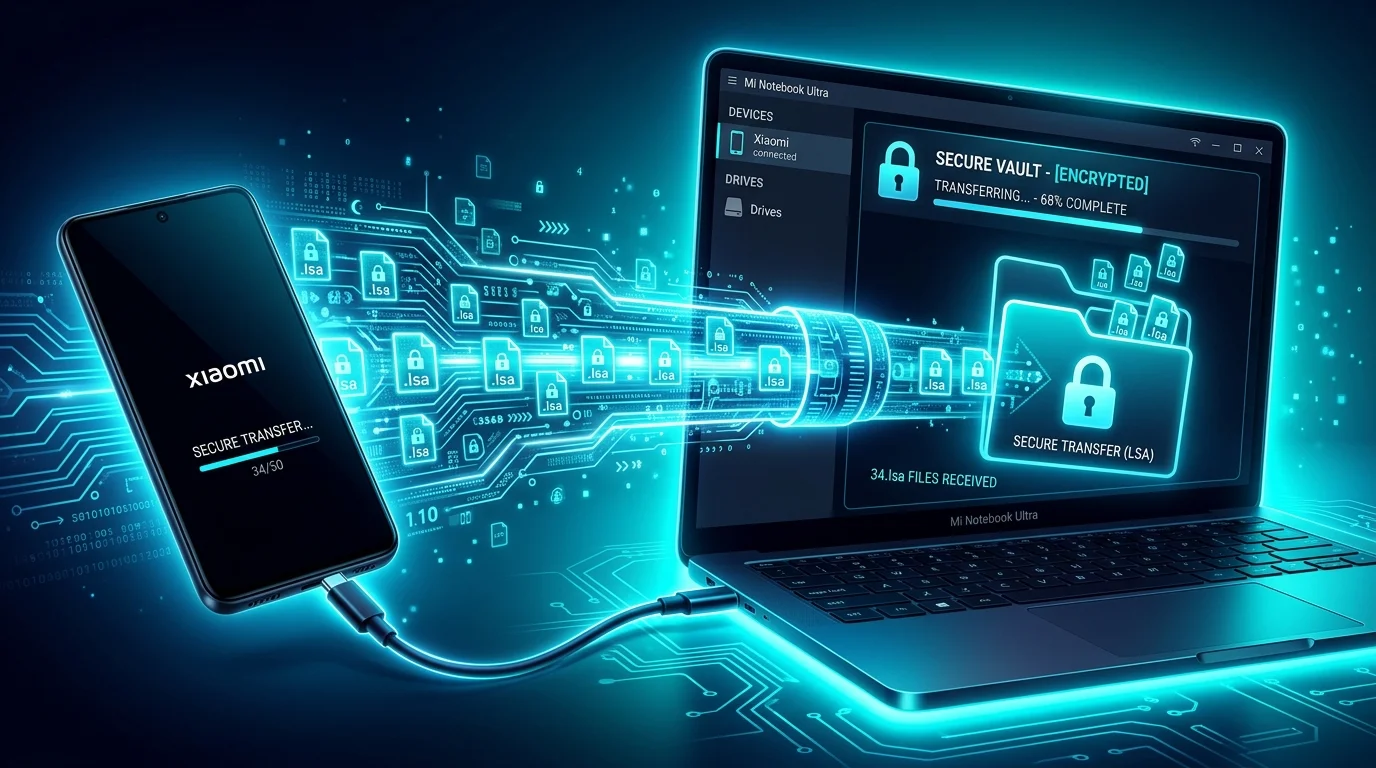
MIUI Decrypt recovery workflow: from encrypted .lsa and .lsav files back to viewable photos and videos.
MIUI Gallery's Secret Album is a privacy feature that hides photos and videos behind a separate authentication wall. When you move media into Secret Album, MIUI encrypts the underlying files using AES-128 in CTR mode, renames them to .lsa (photos) or.lsav (videos), and stores them in a protected directory. This is not a simple file-hiding mechanism — it is cryptographic encryption that renders the files unreadable without the correct key [3][4].
Recovery becomes necessary in several scenarios: you reset your device without backing up Secret Album contents, you switch to a different ROM or custom firmware, you are migrating to a non-Xiaomi device, or you simply need to access your media on a computer. Because the encryption key is derived from the MIUI Gallery APK signing certificate — not from your Mi Account password — the files cannot be decrypted through Xiaomi Cloud alone. You need a purpose-built recovery tool that understands the .lsa and .lsav container format.
This guide walks you through the complete recovery process: from exporting encrypted files on your Xiaomi device, through metadata validation and AES-128-CTR decryption in the MIUI Decrypt service, to importing the recovered media back into your gallery. Along the way, we explain the cryptographic mechanisms involved, common failure modes, and best practices for securing your decrypted files afterward.
Understanding MIUI Secret Album encryption
Before recovering your files, it helps to understand exactly how MIUI encrypts them. The Secret Album feature uses AES-128 in CTR (counter) mode, a stream-cipher variant of the Advanced Encryption Standard defined by NIST [1][2]. In CTR mode, AES encrypts successive counter values to produce a keystream, which is then XORed with the plaintext. Decryption uses the same operation: XORing the ciphertext with the keystream restores the original bytes.
The encryption key
The 128-bit AES key is not random — it is derived from the MIUI Gallery APK signing certificate. Specifically, the first 16 bytes of the X.509 certificate in DER encoding serve as the encryption key [3]. This means every Secret Album file encrypted by the same MIUI Gallery build uses the same key. The key is tied to the application's signature, not to any user-specific secret.
The filename of each encrypted file contains an MD5 hash of this key. For example, a file named 3e751332435bfad27569ca4efed1b602.lsa has an MD5 fingerprint of 3e751332435bfad27569ca4efed1b602, which corresponds to the standard MIUI Gallery signing certificate used across MIUI 12–14 and most HyperOS builds. This fingerprint allows MIUI to identify which key was used when the file was created.
The initialization vector
CTR mode requires a nonce or counter value. MIUI uses a hardcoded 16-byte initialization vector (IV) embedded directly in the Gallery application code. Because the IV is a fixed value that never changes, the same plaintext encrypted with the same key produces identical ciphertext every time. This means the scheme does not achieve semantic security — a cryptographically rigorous design would use a fresh random nonce per encryption.
Photo vs. video encryption
Photos (.lsa) and videos (.lsav) are encrypted differently:
Photos (.lsa): The entire file is AES-128-CTR ciphertext. Every byte from position 0 to the end of the file is encrypted. Decryption must process the full file to recover the original JPEG, HEIC, or PNG image.
Videos (.lsav): Only the first 1024 bytes are encrypted. This is sufficient to corrupt the MP4 file header — specifically the ftyp and moov atoms — so that standard media players cannot open the file. The remaining bytes (the audio and video track data) are stored in plaintext. Decrypting just the first 1024 bytes and concatenating them with the rest of the file produces a playable MP4.
This header-only encryption design has important privacy implications: most of the video data is unprotected. Anyone who knows that only the first 1024 bytes are encrypted could discard the header and extract the raw media stream. The practical protection is obfuscation — the file cannot be played by casual inspection — rather than true cryptographic confidentiality.
AES-128-CTR encryption scheme used by MIUI Secret Album. The key is derived from the APK signing certificate, the IV is hardcoded in the Gallery app, and the XOR operation converts plaintext media bytes into .lsa/.lsav ciphertext.
The complete format reference — including byte-level layout, filename conventions, and decryption parameters — is available in our LSA/LSAV file format guide.
Step 1: Exporting encrypted files from MIUI Gallery
The first step in recovery is getting the encrypted .lsa or .lsav files off your Xiaomi device and onto your computer. MIUI Gallery provides an export function specifically for this purpose.
Export procedure
Open the MIUI Gallery app on your device.
Navigate to the Secret Album section (usually accessible from the Albums tab, secured by PIN, pattern, or biometric authentication).
Long-press a photo or video to select it, or tap the menu icon and choose Select for multiple items.
Tap the Export button. MIUI will prompt you to confirm the export action.
The exported file will appear with a .lsa (photo) or .lsav (video) extension. Copy these files to your computer via USB cable, Bluetooth, cloud storage (Google Drive, Dropbox), or a file transfer app like Send Anywhere.
Important considerations
Export from the same MIUI version: The encryption key is tied to the MIUI Gallery APK signing certificate. If you export a file from one MIUI version and attempt to decrypt it with a key extracted from a different version, decryption will fail unless the APK signing certificate has not changed. In most MIUI 12–14 and HyperOS builds, the certificate is identical, but there are exceptions.
Batch export: MIUI Gallery allows exporting multiple files at once. For large collections, consider exporting in batches to keep files organized.
File names: Do not rename the exported files before uploading. The filename contains the MD5 key fingerprint that MIUI Decrypt uses to identify the correct decryption key.
Compressed archives: If you have many files, compress them into a ZIP archive before uploading. This speeds up transfer and keeps your files organized.
Step 2: Uploading and decrypting with MIUI Decrypt
MIUI Decrypt is a purpose-built web service that handles the entire decryption workflow — from metadata extraction through AES-128-CTR decryption to integrity verification. The service runs entirely server-side; you upload the encrypted file, and the backend handles all cryptographic operations.
Click the drop zone or drag and drop your .lsa or .lsav files. The drop zone accepts single files or multiple files in a ZIP archive.
Optionally, enter a project name to identify your files later.
Click submit. The file is uploaded over a TLS-encrypted connection and queued for processing.
Metadata validation
Before any decryption takes place, MIUI Decrypt reads the file metadata:
Key fingerprint: Extracted from the filename (the MD5 hash portion). This is matched against a database of known MIUI Gallery keys.
File type: Determined from the extension (.lsa vs. .lsav), which dictates how much of the file to decrypt.
File size: Checked against tier-specific upload limits. See the privacy guide for details on limits for anonymous, registered, and credit-holding users.
MIUI version compatibility: If the key fingerprint does not match any known key, the service alerts you and provides guidance on extracting the key from your specific MIUI Gallery APK.
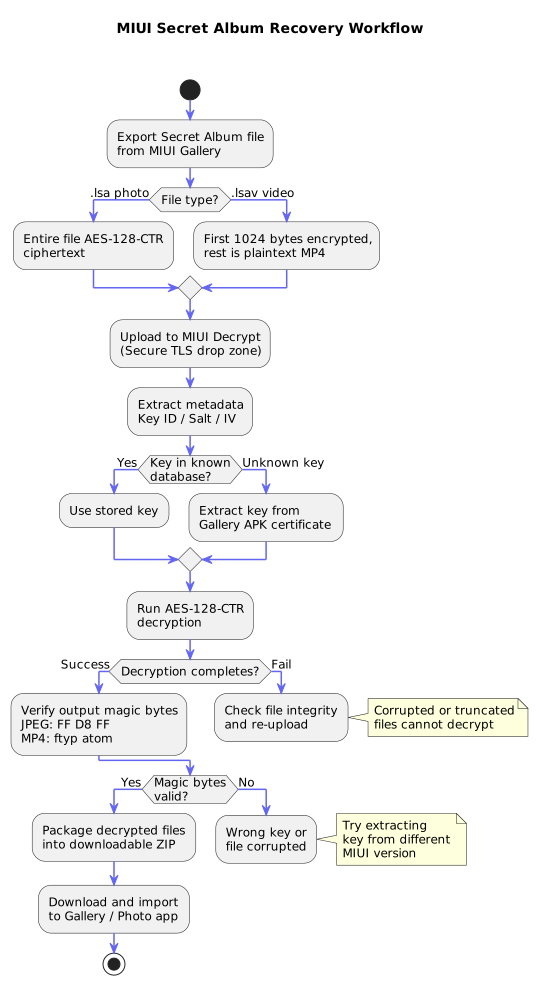
Complete recovery workflow from encrypted file to decrypted download. Each decision point — key lookup, decryption success, and magic byte verification — is checked before proceeding.
Decryption engine
Once metadata validation passes, the decryption engine runs:
Key selection: The matching AES-128 key is loaded from the known key database. If the key fingerprint is unrecognized, the system prompts you to provide the key extracted from your MIUI Gallery APK.
CTR mode decryption: AES-128 in CTR mode is initialized with the key and the fixed IV. For .lsa photos, the entire file is decrypted. For .lsav videos, only the first 1024 bytes are decrypted.
Post-decryption validation: The decrypted output is checked for valid magic bytes. JPEG images must start with FF D8 FF, HEIC images with 00 00 00 18 ftypmif1, and MP4 videos with 00 00 00 18 ftyp. If these magic bytes are absent, the decryption likely used the wrong key or the file is corrupted.
Progress tracking
MIUI Decrypt uses Server-Sent Events (SSE) to stream real-time progress updates to your browser. You can monitor each stage — upload, metadata extraction, decryption, and verification — directly from the web page. If the browser tab is closed, the job continues running server-side and completes automatically. You can check the status of your jobs from the My Files page.
Step 3: Verifying and importing recovered files
After decryption completes successfully, you can download the recovered files as a ZIP archive. The ZIP contains the decrypted media files with their original formats restored.
Download
Photo output: Decrypted .lsa files become JPEG, HEIC, or PNG images. The file extension is restored to the correct format.
Video output: Decrypted .lsav files become complete MP4 containers with proper headers, video tracks, and audio tracks.
Preview: Each file has an automatically generated preview thumbnail that you can inspect before downloading the full archive. You can also preview the recovered files directly in your browser using our dedicated viewer.
Importing to a device
Download the ZIP archive to your computer.
Extract the files. On Windows, right-click and select Extract All. On macOS, double-click the archive.
Transfer the extracted files to your Xiaomi device via USB cable or cloud storage.
Open MIUI Gallery or Google Photos on your device. The app should automatically detect the new media files and index them into your gallery.
If automatic detection does not work, manually navigate to the folder where you saved the files and use the Import or Add to Gallery option in the Gallery app.
Video post-processing
In some cases, decrypted MP4 videos may require additional processing. Because the original MP4 header was encrypted and the file was truncated or modified during export, the decrypted header may have incorrect duration or seek table metadata. If a video plays but has wrong timestamps or does not seek properly, remuxing it with a tool like FFmpeg can repair the metadata:
The -c copy flag tells FFmpeg to copy the video and audio streams without re-encoding, so the operation is fast and lossless. Only the container metadata is rewritten.
Step 4: Keeping decrypted files secure
Once your files are decrypted, they are no longer protected by Secret Album encryption. The original .lsa / .lsav encryption is broken, and the files exist as standard JPEG, HEIC, PNG, or MP4 files that any app can read.
Security recommendations
Re-import to Secret Album: If you want to maintain the same level of protection, copy the decrypted files back into MIUI Gallery's Secret Album. The gallery will re-encrypt them using the same AES-128-CTR scheme.
Use a secure vault app: Third-party vault applications like Cryptomator [7] provide client-side encryption with modern authentication (AES-256-GCM or similar). These tools use per-file random nonces and provide authenticated encryption — a significant improvement over Secret Album's unauthenticated CTR mode.
Full-disk encryption: Modern Android devices (including Xiaomi phones) enable full-disk encryption by default. Ensure this is active in Settings → Security. This protects your files at rest even if the device is lost.
Encrypted cloud backup: If you store decrypted files in the cloud, consider using end-to-end encrypted services like Cryptomator with Google Drive or Tresorit [8].
Delete originals: After confirming your decrypted files are intact, securely delete the original .lsa / .lsav files from your device and computer. Use secure deletion tools if the files contained sensitive content.
Even with a well-designed recovery workflow, things can go wrong. Here are the most common issues and how to resolve them.
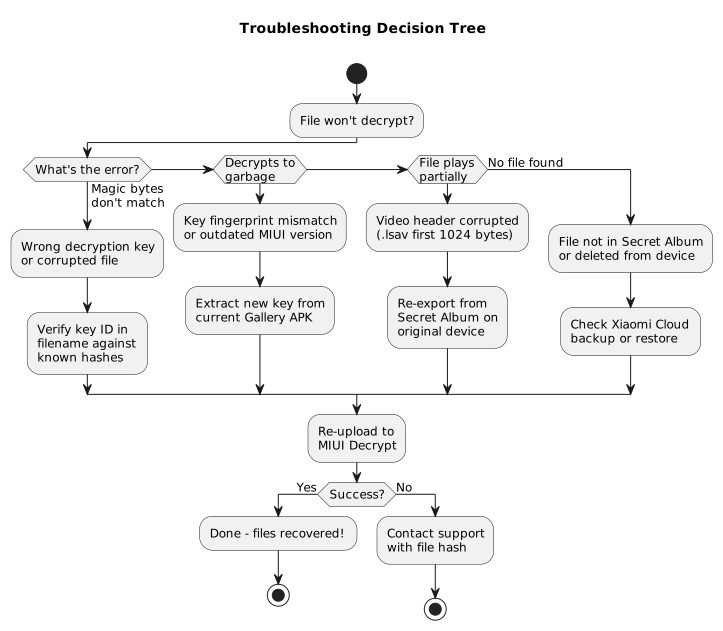
Decision tree for diagnosing decryption failures. Each path leads to a specific recovery action.
Decryption produces garbage output
If the decrypted file does not have valid magic bytes (no JPEG header, no MP4 ftyp atom), the most likely cause is a key mismatch. This happens when:
The file was encrypted by a MIUI Gallery build with a different signing certificate. This can occur after a major MIUI or HyperOS update.
The file was exported from a different device than the one where it was originally encrypted.
The MIUI Gallery APK was sideloaded or installed from a non-official source.
Solution: Extract the AES key from the specific MIUI Gallery APK that encrypted the file. You can do this with standard Java tools:
keytool -printcert -jarfile com.miui.gallery.apk
# The first 16 bytes of the DER-encoded certificate are the AES-128 key.
Then upload this key alongside your file to MIUI Decrypt using the manual key entry option.
Video plays only partially
If the decrypted MP4 video plays but ends abruptly or has incorrect duration, the original .lsav file may have been truncated. Because videos store the bulk of their data in plaintext, a truncated file can still produce a playable video — just not the complete one.
Solution: Re-export the file from the original device. Check that the file size matches the expected size of the original video file. If the original device is unavailable, you may need to locate a backup copy from Xiaomi Cloud or a local backup.
File not found on device
If you cannot find the encrypted files on your device after exporting from Secret Album, the files may have been deleted or the export may have failed silently.
Solution: Check the following locations on your device:
Internal Storage/MIUI/Gallery/cloud/secretAlbum/ — the standard path for Secret Album files before export.
Internal Storage/Download/ or Internal Storage/MIUI/Gallery/ — the default export destination.
Xiaomi Cloud: If you have cloud backup enabled, your Secret Album files may be available through the Xiaomi Cloud web interface at i.mi.com.
Upload fails due to size limits
MIUI Decrypt enforces file size limits based on your user tier:
Anonymous users: 10 MB for photos, video upload disabled
Registered users: 20 MB for photos, 50 MB for videos
Users with credits: 35 MB for photos, 200 MB for videos
Solution: Register for a free account or purchase credits to increase your upload limits. Large video files can also be split into smaller segments using FFmpeg or a video splitting tool before uploading.
System overload (503 errors)
During peak usage, the decryption queue may be full. The service uses KEDA to auto-scale worker pods based on queue depth, but there is a brief delay before new workers come online.
Solution: Wait a few minutes and retry. The job is queued and will process automatically once workers become available. Your upload is not lost — the system stores the job in RabbitMQ and processes it as capacity allows.
Security analysis and limitations
While Secret Album encryption protects casual access to hidden files, it has several cryptographic limitations that users should understand.
Property
Secret Album
Modern alternative
Cipher
AES-128-CTR
AES-256-GCM / XChaCha20-Poly1305
Key entropy
Static (same for all users)
Per-user or per-file random
Authentication
None (no MAC / HMAC)
AEAD (authenticated encryption)
IV uniqueness
Fixed IV — not unique
Random per-file nonce
Semantic security
No (same plaintext = same ciphertext)
Yes
Forward secrecy
No
Possible with key rotation
Key observations
Not user-specific: Because the encryption key is derived from the APK signing certificate, it is the same for all devices running the same MIUI Gallery version. An attacker who extracts the key from one device can decrypt any Secret Album file created by that Gallery build.
No authentication: CTR mode does not provide integrity verification. If any ciphertext byte is altered (by storage corruption, transmission errors, or intentional modification), decryption produces corrupted output with no warning. There is no HMAC, no GCM auth tag, and no checksum [2].
Partial video protection: For videos, only the first 1024 bytes are encrypted. The remaining video data is stored in plaintext. This design means that a determined party can recover most of the video content without decryption by simply stripping the encrypted header.
Key distribution: The encryption key must be kept secret within the MIUI Gallery APK. Obfuscation and certificate pinning provide some protection, but the key can be extracted with standard tools like keytool and apktool.
For files that truly require strong privacy, Secret Album should be considered a first layer of protection. Supplement it with client-side encryption tools like Cryptomator [7] or VeraCrypt [6].
ObikBobik, miui-cloud-decryptor: Xiaomi gallery hidden files decryptor (.lsa/.lsav), GitHub repository. https://github.com/ObikBobik/miui-cloud-decryptor Independent reverse engineering confirming AES-128-CTR with a hardcoded IV and the APK certificate as the encryption key.
Dennis Kabui, Decrypting MIUI Cloud files, October 2025. https://blog.denniskabui.com/decrypting-miui-cloud/ Technical analysis confirming header-only encryption for .lsav videos and the AES-128-CTR implementation details.
Google Android Developers, Android Keystore System. https://developer.android.com/privacy-and-security/keystore Official Android documentation on hardware-backed key storage. MIUI Gallery's static-key approach differs from the per-app Keystore model.
Kubernetes Event-driven Autoscaling (KEDA), RabbitMQ Queue Trigger. https://keda.sh/docs/latest/scalers/rabbitmq-queue/ KEDA monitors RabbitMQ queue depth to auto-scale decrypt worker pods based on demand.
Xiaomi, Xiaomi Cloud — Manage your data. https://i.mi.com Official Xiaomi Cloud portal where Secret Album backups may be available for download.
About the author
MIUI Decrypt Support publishes practical guidance for MIUI Secret Album recovery, Xiaomi privacy, and .lsa/.lsav troubleshooting so users can make informed decisions before they upload.
Every blog article is designed to match the product experience: clear explanations, realistic recovery expectations, and a direct path back to the decrypt workflow.
Related articles
Explore more MIUI Gallery recovery guides from the LSA Decrypt team.
Upload your Secret Album file and follow the recovery wizard
Our service validates metadata automatically, shows the AES decryption steps in real time, and streams your decrypted photos securely to a downloadable ZIP archive.