Xiaomi Privacy & Security Guide for Secret Album Users
Detailed analysis of Xiaomi data collection practices, Secret Album AES-128-CTR encryption architecture with APK certificate key derivation, risk assessment matrix, and post-decryption security workflow for keeping recovered photos private.
MIUI Decrypt Privacy Team publishes practical guidance for MIUI Secret Album recovery, Xiaomi privacy, and .lsa/.lsav troubleshooting so users can make informed decisions before they upload.
Every blog article is designed to match the product experience: clear explanations, realistic recovery expectations, and a direct path back to the decrypt workflow.
Related articles
Explore more MIUI Gallery recovery guides from the LSA Decrypt team.
Xiaomi Privacy & Security Guide for Secret Album Users
Detailed analysis of Xiaomi data collection practices, Secret Album AES-128-CTR encryption architecture with APK certificate key derivation, risk assessment matrix, and post-decryption security workflow for keeping recovered photos private.
MIUI Decrypt illustration: visualizing the privacy boundaries that keep Xiaomi Secret Album recoveries controlled and secure.
When you move a photo into Xiaomi's Secret Album, MIUI Gallery encrypts it into a.lsa file using AES-128-CTR [1]with a key derived from the Gallery APK's signing certificate and a fixed initialization vector hardcoded in the app [2]. The encryption prevents casual access — a file manager cannot display a.lsa as a viewable image — but the key is neither unique per file nor bound to your lock screen PIN. Understanding exactly what this encryption protects, what it does not, and how Xiaomi's infrastructure interacts with your data is the foundation of any sound privacy decision around Secret Album.
This guide examines Xiaomi's data collection practices for Gallery and Secret Album, describes the actual encryption architecture that MIUI uses, assesses the real-world privacy risks at every stage of the recovery process, and lays out a concrete security workflow for handling decrypted photos. Whether you are a privacy-conscious user who keeps everything in Secret Album or someone who only recently discovered that your Xiaomi device was encrypting files, this guide gives you a framework for understanding exactly where your data lives and who can reach it.
Xiaomi's data collection model for Gallery
Xiaomi's MIUI Gallery operates as a cloud-backed service. When you take a photo, the Gallery app stores it locally and offers optional cloud sync via Mi Cloud. When you move a photo into Secret Album, MIUI encrypts it on-device and stores the resulting.lsa file locally. If you have Mi Cloud backup enabled, the encrypted container is uploaded to Xiaomi's servers along with telemetry metadata.
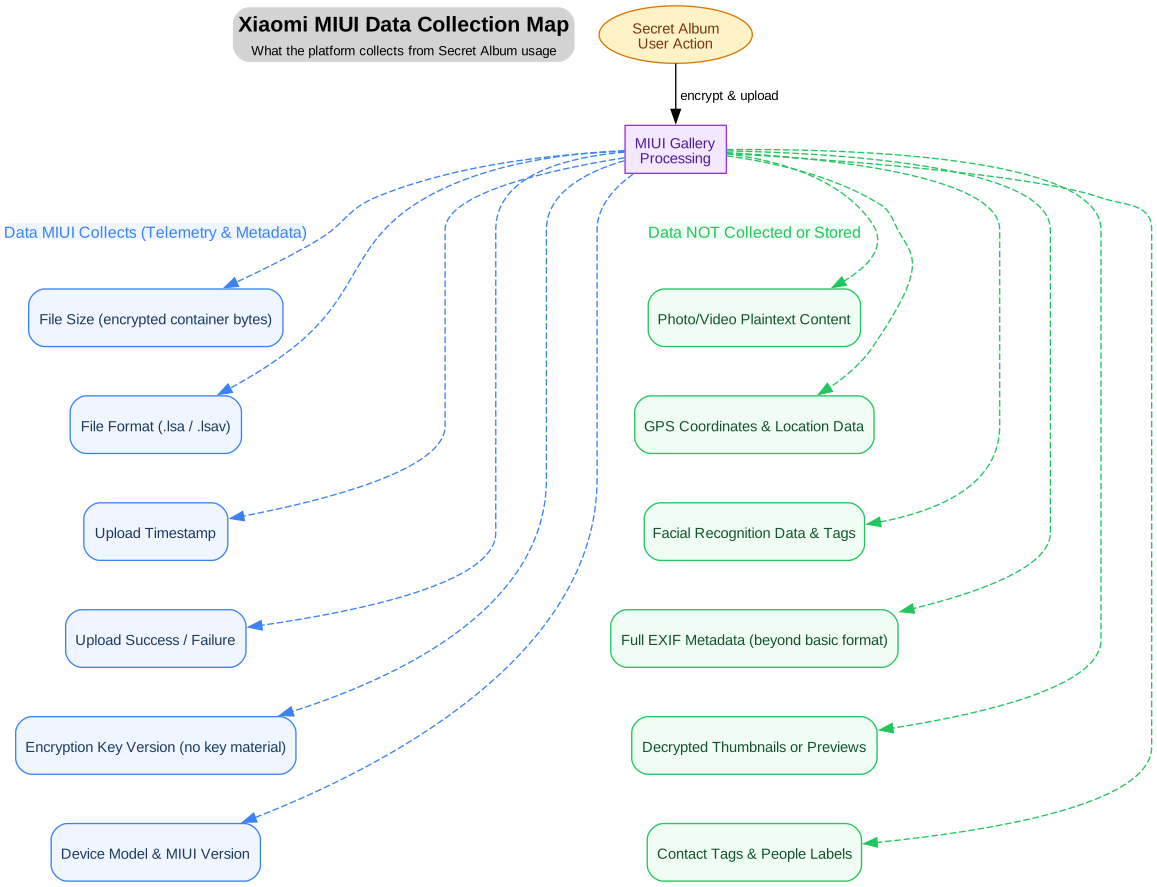
The diagram below summarises exactly what data MIUI collects versus what it never sees in the clear.
Xiaomi's data collection boundaries for Secret Album: MIUI logs telemetry about file operations (size, format, timing, success rate) and the opaque key version identifier, but never has access to the plaintext content, location data, or any decrypted preview.
Telemetry collected by MIUI Gallery
The telemetry that MIUI Gallery collects falls into five narrow categories, all of which are processed as metadata alongside the encrypted container:
File characteristics: The size of the encrypted .lsaor .lsav container in bytes, the file format extension, and the internal encryption key version number. These values are necessary for Xiaomi to track storage usage and to ensure that cloud-synced files can be decrypted on another device running a compatible MIUI version.
Operation timestamps: The time at which a file was encrypted, uploaded to Mi Cloud, or synced between devices. MIUI uses this for backup ordering and conflict resolution.
Success and failure signals: A binary record of whether each encryption, upload, or sync operation completed successfully or failed. This is standard telemetry that any cloud-backed service collects, and it contains no information about the content of the file itself.
Device and MIUI version identifiers: The device model number and the current MIUI or HyperOS version. Xiaomi uses this data to ensure backward compatibility of the encryption scheme across different devices and OS releases.
Aggregate usage counters: The total number of files in Secret Album, total encrypted storage consumed, and the count of files encrypted or decrypted per session. These counters are anonymised and used for product analytics.
It is important to note that none of this telemetry includes any portion of the plaintext photo, any biometric or facial recognition match data, any GPS coordinates, or any human-readable tags or captions you may have attached to the photo inside the Gallery app. The encryption keeps the pixel data opaque, but it is worth noting that Xiaomi possesses the signing certificate used for the encryption key, which has practical implications discussed later in this guide.
Data that MIUI does not collect from Secret Album
Understanding what is not collected is just as important as understanding what is. The following data categories never leave the device in plaintext form and are never accessible to Xiaomi or any third party through the normal operation of Secret Album:
Photo and video plaintext: The actual pixel data, colour profiles, and encoding artefacts of your photos and videos remain inside the encrypted payload at all times. Neither MIUI Gallery nor Mi Cloud ever stores or transmits the plaintext bytes of your media files.
GPS coordinates and location data: While the original photo may contain GPS coordinates in its EXIF metadata, those coordinates are encrypted as part of the payload. MIUI does not extract or index location data from files inside Secret Album.
Facial recognition data: Xiaomi's Gallery app includes a people album feature that uses on-device machine learning to group photos by face. These facial recognition vectors and match data are stored in a separate encrypted database on the device and are not exported or transmitted alongside Secret Album files.
Decrypted thumbnails or previews: MIUI Gallery may generate low-resolution thumbnails for quick browsing in the main gallery view, but once a photo is moved into Secret Album, those thumbnails are removed. No decrypted preview of a Secret Album file is ever stored or transmitted.
Contact tags and people labels: Any tags, captions, or labels you have assigned to people in your photos are stored separately in the Gallery database and are not included in the .lsa container or in any telemetry stream.
Full EXIF metadata: The complete EXIF metadata — camera model, aperture, shutter speed, ISO, flash settings, and all the other photographic parameters — remains encrypted inside the payload.
How Secret Album encryption protects your data
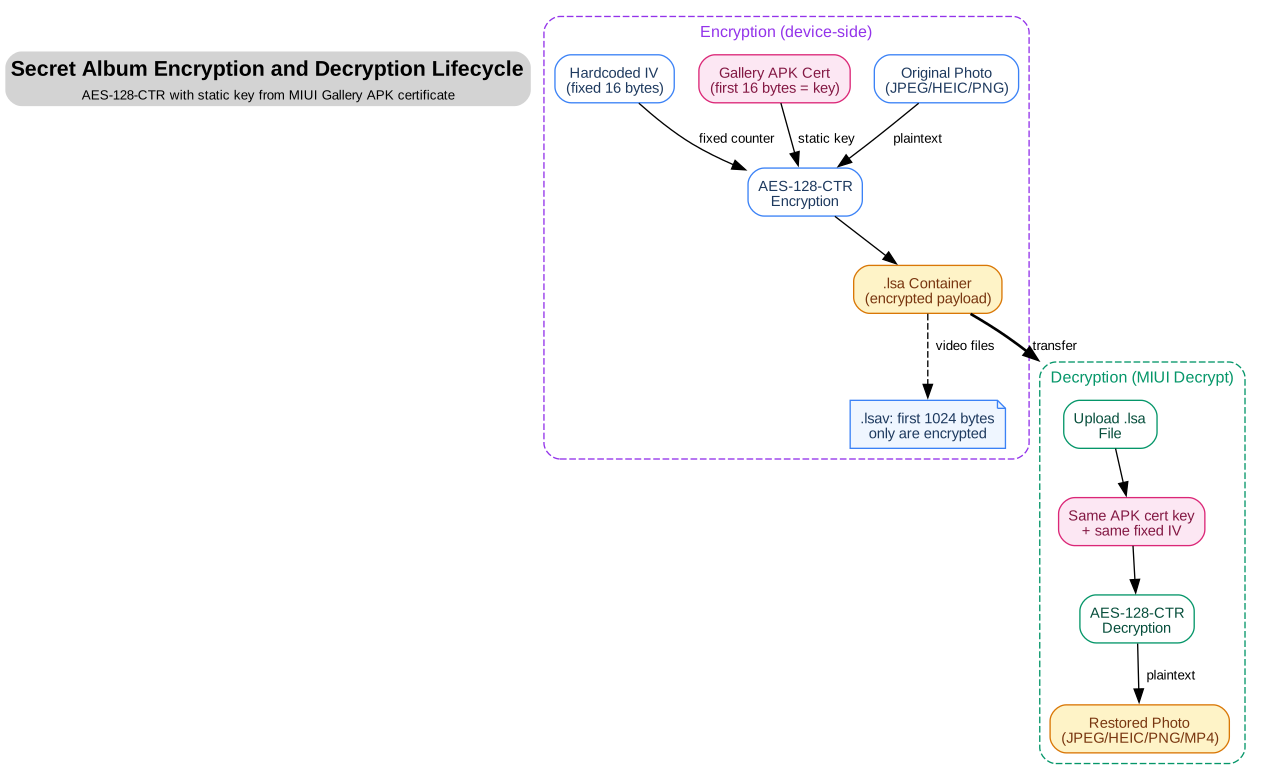
Understanding the actual encryption mechanism that MIUI uses for Secret Album is essential for a realistic assessment of your privacy. The diagram below traces the full lifecycle of a photo — from plaintext capture through encryption, storage, cloud backup, and eventual off-device decryption.
The Secret Album encryption lifecycle: AES-128-CTR encryption with a key derived from the MIUI Gallery APK signing certificate.
On-device encryption process
The encryption scheme is straightforward. MIUI Gallery encrypts the photo file (for .lsa) or the video header (for .lsav) using AES-128-CTR with a static 128-bit key — the first 16 bytes of the MIUI Gallery APK signing certificate — and a fixed 16-byte IV hardcoded in the app. The filename embeds the MD5 hash of the key for version tracking:3e751332435bfad27569ca4efed1b602.lsa. A detailed breakdown of the cipher, key derivation, counter construction, and video-header handling is available in the .lsa file format guide.
Key management and access implications
Because the encryption key is derived from the APK signing certificate — a static, publicly extractable value — the key is neither device-specific nor user-specific. Any party with access to the MIUI Gallery APK can extract the key and decrypt any.lsa or .lsav file encrypted by that APK version. This includes:
Xiaomi itself — the company that signs the APK controls the certificate and therefore the key.
Independent security researchers and tool developers who have reverse-engineered the scheme [2][3].
Anyone who obtains the Gallery APK and has the technical ability to extract the certificate's first 16 bytes.
This is an important distinction from "zero-knowledge" architectures. Xiaomi's Secret Album encryption prevents casual access by other apps on the device and makes files unreadable without specialised software, but it does notprovide cryptographic protection against Xiaomi itself or against anyone who has obtained the APK certificate. The key does not involve the device's Trusted Execution Environment (TEE): it is a software-level key stored in the APK, not a hardware-bound secret.
Xiaomi's Trusted Execution Environment
Xiaomi devices running MIUI 12 and later do incorporate a Trusted Execution Environment — a hardware-isolated secure area within the main processor [5][6]. The TEE is used for other security functions — such as Android's File-Based Encryption (FBE), fingerprint template storage, and payment authentication — but it does not participate in the Secret Album .lsa encryption key derivation. The TEE and Secret Album encryption operate independently: the TEE protects the device at the operating system level, while the Secret Album uses its own application-layer cipher with a static, APK-derived key.
Cloud backup behaviour
When Mi Cloud backup is enabled for Gallery, the encrypted .lsa containers are uploaded to Xiaomi's cloud storage. The files remain encrypted with AES-128-CTR during transit and at rest on Xiaomi's servers. However, because Xiaomi controls the APK signing certificate, the company has the technical ability to decrypt the files. This is not a zero-knowledge architecture: Xiaomi stores the encrypted files but also possesses the means to decrypt them.
The cloud backup provides redundancy — if you lose your device, you can access the encrypted containers through your Mi Cloud account — but the privacy guarantee is significantly weaker than what end-to-end encrypted services offer. If Xiaomi receives a lawful request for your data, the company can technically comply by decrypting the files server-side.
What MIUI can and cannot see: access control analysis
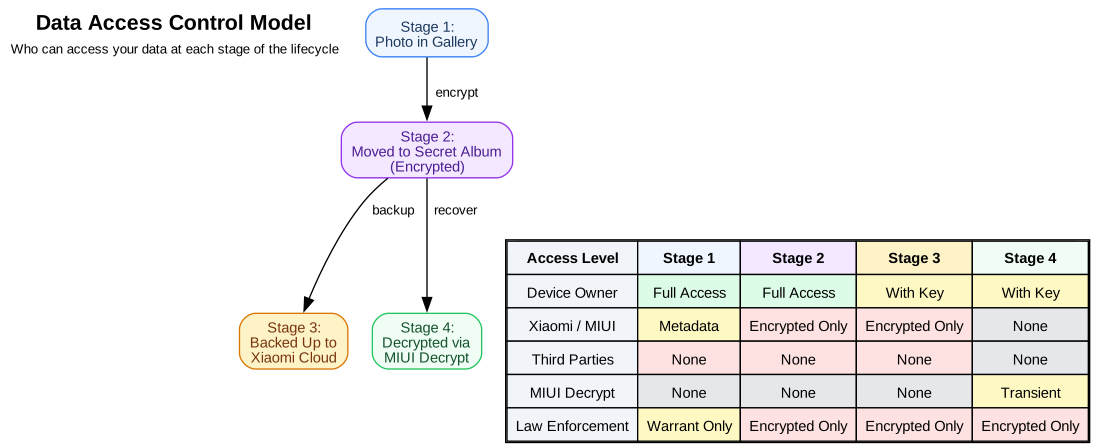
Privacy is not binary. The question is not "does Xiaomi have access to my data?" but rather "what specific data can each party access at each stage of the lifecycle?" The answer changes depending on whether the data is at rest on your device, in transit during a cloud sync, stored on Xiaomi's servers, or in the middle of being decrypted by a third-party tool. The access control matrix below maps out exactly who can see what, across all four stages.
Access control matrix: each party's ability to view plaintext data at each stage of the Secret Album lifecycle. Unlike the previous section indicates, Xiaomi has the technical capability to decrypt .lsa files via the APK certificate key.
Stage 1: Photo in standard Gallery view
While a photo is in the regular MIUI Gallery (not yet moved to Secret Album), it is stored as a standard JPEG, HEIC, or PNG file on the device's internal storage. At this stage, any app that has storage permissions can read the file. If Mi Cloud sync is enabled, the plaintext photo is uploaded to Xiaomi's servers. This is the stage at which the most data is visible to the most parties — and it is also the stage that many privacy-conscious users seek to minimise by moving everything into Secret Album.
Stage 2: Photo inside Secret Album
Once the photo is encrypted and stored as an .lsa container, access narrows. The device owner can still decrypt and view the photo within MIUI Gallery. Xiaomi itself can decrypt the file using the APK certificate key. Third-party apps on the device cannot parse the .lsa container natively — they would need the decryption key — but the key is publicly extractable from the APK.
Stage 3: Cloud backup on Mi Cloud
When the encrypted container is uploaded to Mi Cloud, the same access properties apply: Xiaomi can decrypt the files using the APK certificate key. Law enforcement with a valid warrant could compel Xiaomi to hand over both the stored encrypted files and the decryption key. This is in contrast to genuinely zero-knowledge services where the provider has no technical means to decrypt user data.
This is a significant difference from services that implement end-to-end encryption or client-side encryption with user-managed keys. With Secret Album, Xiaomi retains the ability to decrypt your files — a design choice that favours recoverability and cloud sync convenience over maximum privacy.
Stage 4: Off-device decryption
When you use a service like MIUI Decrypt to recover your photos on a computer, the.lsa file is processed by a decryption pipeline that runs on the service's servers. During processing, the decrypted plaintext exists in memory on the server for the duration of the operation — typically two to ten seconds for a photo. MIUI Decrypt does not store the plaintext permanently. After the decrypted file is delivered to your browser for download, the temporary processing files are deleted. The service retains only the job metadata (timestamp, file size, success status) for operational purposes, and the original .lsa file if you chose to have it stored for later access within the 24-hour retention window.
Privacy risk assessment for Secret Album users
Understanding the actual encryption properties of Secret Album is essential for a practical risk assessment. The risk matrix below evaluates eight threat scenarios by their likelihood of occurring and the impact they would have on your privacy, then recommends specific mitigations for each.
Privacy risk assessment matrix: eight threat scenarios evaluated by likelihood, impact, and overall risk level, with recommended mitigations accounting for the APK-derived encryption key.
Critical risk: decrypted file exposure
The single highest-risk scenario for Secret Album users is not a data breach at Xiaomi, nor a sophisticated attack on the TEE, but something far more mundane: leaving decrypted copies of sensitive photos unprotected on your computer, cloud storage, or phone after you have recovered them. Once a photo leaves the encrypted .lsa container, it becomes a standard JPEG or HEIC file with no encryption, no access control, and no protection beyond whatever the storage medium provides by default.
This risk is categorised as Critical — the highest level in our assessment — because it combines medium likelihood (many users forget to clean up temporary files) with very high impact (a decrypted photo contains all the original data, including potentially sensitive content and embedded metadata). The good news is that this is also the risk you have the most direct control over. The post-decryption security workflow in the next section provides a step-by-step process for eliminating this exposure.
Device loss or theft
A lost or stolen Xiaomi device presents a high risk because the attacker has physical possession of both the encrypted .lsa files and the device. However, the .lsa files themselves can be decrypted with the APK certificate key — which an attacker could extract from a downloaded Gallery APK — so physical possession of your specific device is not strictly necessary for decryption. The practical protection comes from the fact that extracting the APK and running the decryption requires technical skills that casual thieves lack. Using a strong lock screen PIN does not affect the Secret Album encryption key directly, but it does prevent an attacker from accessing the MIUI Gallery app to view the photos through the intended interface.
Mi Cloud account compromise
If an attacker gains access to your Mi Cloud account, they can download your encrypted .lsa files and decrypt them using the publicly known APK certificate key. This is a significant difference from zero-knowledge architectures: a cloud account compromise does equate to a photo leak, because the decryption key is not tied to your specific device or account. Enabling two-factor authentication on your Mi account is essential — it makes it harder for attackers to gain access to the account in the first place — but it does not protect against Xiaomi's own ability to decrypt or against a server-side breach.
Securing decrypted files: post-recovery workflow
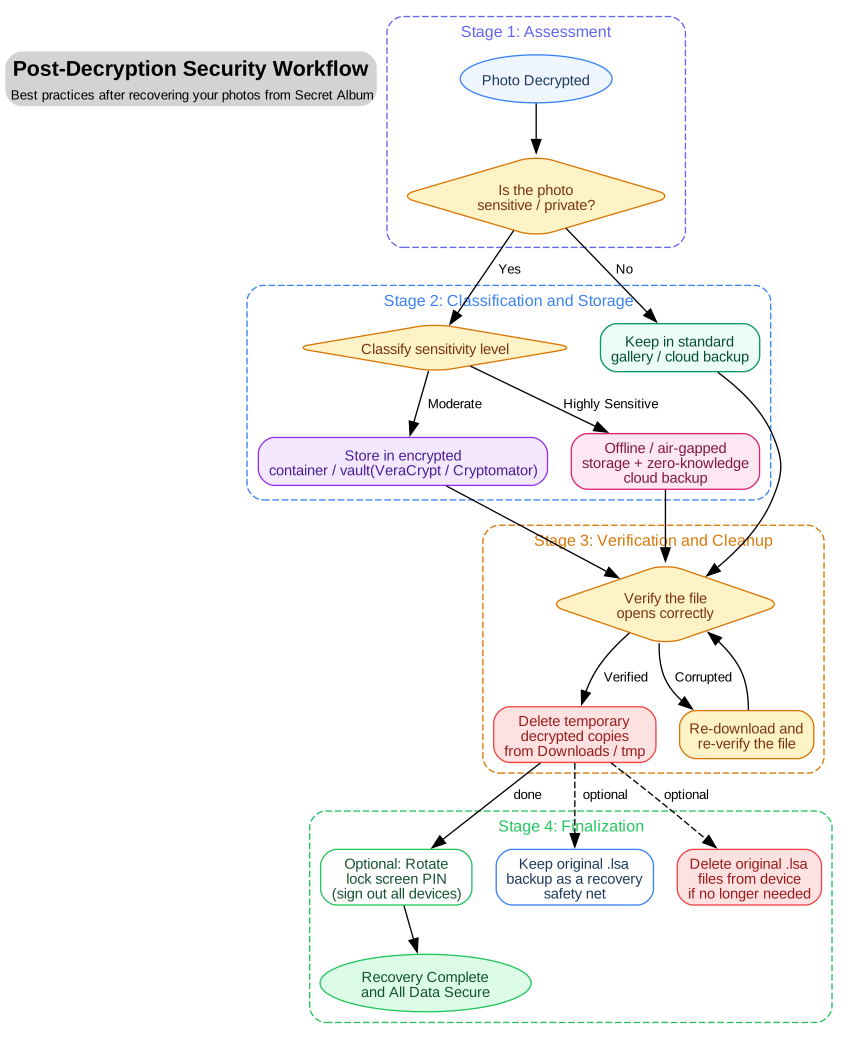
Every time you decrypt a Secret Album file, you create a moment of maximum privacy risk: the plaintext photo exists outside the encrypted container, and you are responsible for protecting it. The workflow below is designed to turn that moment from a vulnerability into a controlled process. Follow these steps every time you recover files from Secret Album.
Post-decryption security workflow decision tree: the flowchart guides you from the moment a photo is decrypted through classification, secure storage, verification, temporary file cleanup, and optional PIN rotation.
Step 1: Classify the sensitivity of each photo
Before you do anything else, decide what level of protection the photo requires. This classification determines every subsequent step in the workflow:
Not sensitive: Everyday photos — landscapes, food, public events — that you would not mind sharing broadly. These can be stored in your standard photo gallery or backed up to any cloud service without additional protection.
Moderately sensitive: Personal photos that you would prefer not to share widely — family gatherings, private moments, documents with personal information. These should be stored in an encrypted container or vault before being backed up to any cloud service.
Highly sensitive: Photos that could cause significant harm if exposed — identification documents, financial records, intimate images, or any content that you would not want anyone else to see under any circumstances. These should be stored in offline or air-gapped storage with a zero-knowledge cloud backup as a secondary copy.
Step 2: Store in an encrypted container
For moderately and highly sensitive photos, the safest storage method is an encrypted container — a single file that acts as a secure vault for any number of other files. The container is encrypted with a password of your choice, and decrypting it requires both the container file and the password. Recommended tools include:
VeraCrypt[7](Windows, macOS, Linux): Creates encrypted volumes that can be mounted as virtual drives. Supports AES, Serpent, and Twofish encryption algorithms, and can create hidden volumes for plausible deniability. VeraCrypt is open-source and has been independently audited.
Cryptomator[8](Windows, macOS, Linux, iOS, Android): Encrypts individual files before they are uploaded to cloud storage providers like Google Drive, Dropbox, or OneDrive. Each file is encrypted separately with AES-256-GCM, and the folder structure is obfuscated. Cryptomator is particularly useful if you want to back up decrypted photos to an existing cloud service without trusting that service with your plaintext.
Android scoped storage / Protected folders: On Xiaomi devices, the built-in "Protected folders" feature provides a lightweight encrypted container that integrates with the file manager. This is suitable for moderately sensitive photos that need to remain accessible on the device.
Step 3: Verify file integrity after transfer
Before you delete the temporary decrypted copy, verify that the file opens correctly in its new location. Open it in a photo viewer from within the encrypted container (for VeraCrypt or Cryptomator) or directly from the protected folder. Check that the full-resolution image displays correctly, that the aspect ratio is preserved, and that the colours look correct. If the file appears corrupted, re-download it from MIUI Decrypt and repeat the storage process.
Step 4: Delete temporary decrypted copies
This is the single most important step in the workflow. After you have verified that the photo is safely stored in its encrypted location, delete the temporary decrypted copy from:
Your browser's Downloads folder
Your desktop or any work folder you used during recovery
The temporary processing directory on the server (MIUI Decrypt handles this automatically, but you can manually delete the job from the job management page if you prefer)
The "Recently Deleted" or trash folder on your operating system — emptied trash is permanently deleted; trashed files can be recovered
On Windows, use cipher /w:C:\ to overwrite deleted file data on the drive. On macOS, enable FileVault full-disk encryption so that deleted files are encrypted at rest. On Linux, use shred or wipe if the files were stored on an unencrypted filesystem.
Step 5: Optionally rotate your lock screen PIN
If you have decrypted files from Secret Album because your phone is lost, stolen, or compromised, or if you suspect that someone may have observed your lock screen PIN, change it immediately. This protects the device-level File-Based Encryption (FBE) that secures all data on your phone, and prevents an attacker with physical access from using the MIUI Gallery to view Secret Album contents through the intended interface. Note that changing the PIN does not invalidate the.lsa encryption key, which is independent of the PIN.
Step 6: Manage the original .lsa files
You have two options for the original encrypted .lsa files after decryption:
Keep them as a backup safety net: The .lsa files are encrypted and contain no plaintext data. Storing them in a safe location (external drive, cloud storage) gives you a recoverable copy of your photos that remains encrypted. If your device is lost or damaged, you can use MIUI Decrypt to recover the photos from the .lsa files alone — you do not need the original Xiaomi device.
Delete them if no longer needed: Once you have verified that the decrypted photos are safely stored, you can delete the .lsa files from your device to free storage space.
Regional privacy considerations: China ROM vs. Global ROM
Xiaomi ships different versions of MIUI for different markets, and the privacy properties of Secret Album differ between them in important ways. If you are using a device purchased in China with the China ROM, some additional data handling practices apply that are not present on Global ROM devices.
Global ROM (EEA / Global / India / Indonesia / Turkey / Russia / Taiwan)
Devices running MIUI Global ROM are subject to regional privacy regulations — most notably the EU's General Data Protection Regulation (GDPR) for EEA devices [9], and similar data protection laws in other markets. On Global ROM devices, the data collection described in the first section of this guide applies in full, and Xiaomi's privacy policy commits to not collecting additional telemetry beyond what is described. The Secret Album encryption algorithm (AES-128-CTR with the APK certificate key) is identical across all ROM versions. EEA user data is stored on servers in Germany (AWS) and the Netherlands (Azure) [10].
China ROM
Devices with the China ROM may transmit additional telemetry data to Xiaomi's Chinese servers, including more detailed device usage statistics and crash reports. The encryption scheme for Secret Album files is the same AES-128-CTR with the APK certificate key, so the same access properties apply. However, China ROM user data is stored on Alibaba Cloud and Kingsoft Cloud servers within mainland China, which are subject to Chinese data retention and surveillance laws [10].
The practical difference is in the metadata and telemetry that accompany the encrypted files. China ROM devices may collect additional contextual information at the time of file encryption — such as the network type (Wi-Fi or mobile data) used for cloud sync, the battery level during upload, and more granular device identifiers. If you are using a China ROM device and are concerned about this additional telemetry, you can disable cloud backup for Secret Album entirely in the MIUI Gallery settings, which eliminates the transmission of any encrypted file data to Xiaomi's servers.
HyperOS migration
Xiaomi's transition from MIUI to HyperOS does not change the Secret Album encryption architecture [2]. The .lsa and .lsav container formats use AES-128-CTR encryption with the same APK certificate key derivation regardless of the operating system version. Files encrypted on a MIUI 12 or MIUI 13 device can be decrypted on a HyperOS device — and vice versa — using MIUI Decrypt, because the decryption pipeline is independent of the operating system version.
Privacy checklist for Secret Album users
The following checklist consolidates all the actionable recommendations from this guide into a single reference. Use it after every batch of file recovery, or review it periodically as part of your regular privacy maintenance routine.
Review MIUI Gallery privacy settings. Open the MIUI Gallery app, navigate to Settings → Privacy, and review what data sharing options are enabled. Disable "Share usage statistics" and "Personalised recommendations" if you prefer minimal data collection.
Disable Mi Cloud backup for Secret Album if you do not want Xiaomi to have a copy of your encrypted files.Go to Settings → Mi Account → Mi Cloud → Gallery, and toggle off "Secret Album backup" if you prefer that encrypted files never leave your device.
Enable two-factor authentication on your Mi Account. This prevents attackers from accessing your cloud backup even if they compromise your password. Go to account.xiaomi.com to configure 2FA.
Use a strong lock screen PIN or passphrase. While this does not affect the Secret Album encryption key, it protects your device-level FBE and prevents someone with physical access from viewing Secret Album contents through MIUI Gallery.
Understand that Secret Album encryption is not zero-knowledge.The encryption key is derived from Xiaomi's APK signing certificate, not from your PIN or a device-bound secret. Treat Secret Album as a convenience privacy layer — not as cryptographic protection against Xiaomi.
Classify each photo after decryption. Before you store a recovered photo, decide whether it is not sensitive, moderately sensitive, or highly sensitive, and apply the corresponding storage strategy from the workflow above.
Use encrypted containers for sensitive decrypted files. Choose VeraCrypt for local storage on Windows, macOS, or Linux, or Cryptomator for encrypted cloud backup. Never store sensitive decrypted photos in an unprotected folder or cloud service.
Delete temporary decrypted copies immediately after transfer.Clear your Downloads folder, empty the trash, and if possible use file-shredding tools (cipher /w on Windows, shred on Linux) to prevent recovery of deleted plaintext data.
Back up .lsa files before factory reset or device change. The encrypted files are recoverable via MIUI Decrypt, but only if you have a copy. Copy the entire MIUI/Gallery/cloud/secretAlbum folder to a computer or external drive before resetting your phone. Our dedicated backup guide walks through this process step by step.
Keep your device software up to date. MIUI and HyperOS updates include security patches that protect the operating system and underlying infrastructure. Install updates promptly.
Use MIUI Decrypt's temporary processing environment. The service processes each file in an isolated session, stores nothing permanently, and expires download links after 24 hours. Take advantage of these built-in privacy guarantees by not downloading decrypted files to shared or public computers.
Conclusion
Xiaomi's Secret Album encryption provides a useful privacy layer that prevents casual access to your photos by other apps or unauthorised users who gain temporary access to your device. The AES-128-CTR cipher with the APK certificate-derived key creates an opaque container that standard file managers and media players cannot read. For day-to-day privacy against accidental exposure — lending your phone to someone, app data scraping, malware that scans storage — Secret Album serves its purpose.
However, the encryption is not zero-knowledge, not hardware-bound, and not user-keyed. Xiaomi retains the technical ability to decrypt your files because the key is derived from their own APK signing certificate — a value that is static, publicly extractable, and independent of your PIN or device identity. This design trades maximum privacy for recoverability and cloud convenience: you can always get your photos back from Mi Cloud even if you lose your device, but that same property means Xiaomi's infrastructure holds the keys to your vault.
The moment you decrypt a file — whether for legitimate recovery, migration, or backup — the protection shifts entirely to your own operational discipline. The critical risk identified in this guide is not a flaw in the encryption, but the everyday human reality of handling decrypted files without a structured security process. The post-decryption workflow and checklist in this guide are designed to close that gap.
By following the practices outlined here — classification, encrypted storage, immediate cleanup, and a realistic understanding of what Secret Album does and does not protect — you can maintain privacy for your recovered photos far beyond what the .lsa container provides on its own.
ObikBobik, miui-cloud-decryptor: Xiaomi gallery hidden files decryptor (.lsa/.lsav), GitHub repository. https://github.com/ObikBobik/miui-cloud-decryptor Independent reverse engineering confirming AES-128-CTR with a hardcoded 16-byte IV and the first 16 bytes of the MIUI Gallery APK certificate as the encryption key.
Dennis Kabui, Decrypting MIUI Cloud files, October 2025. https://blog.denniskabui.com/decrypting-miui-cloud/ Technical analysis of the AES-128-CTR implementation used by MIUI Secret Album, including counter reconstruction from the fixed IV.
Xiaomi, MIUI 13 Security White Paper — 2.1 Hardware Trusted Environment. https://trust.mi.com/docs/miui-security-white-paper-global/2/1 Official documentation of Xiaomi's TEE architecture using Qualcomm Secure Execution Environment (QSEE) and MediaTek Mitee.
Check Point Research, Researching Xiaomi's TEE, 2022. https://research.checkpoint.com/2022/researching-xiaomis-tee/ Independent security analysis confirming Xiaomi uses Qualcomm QSEE TEE (Snapdragon) and MediaTek Beanpod/Mitee TEE following GlobalPlatform specifications.
Xiaomi, General Privacy Policy. https://terms.miui.com/doc/privacy/en.html References GDPR compliance, EU Standard Contractual Clauses, Data Protection Officer (dpo@xiaomi.com), and user rights including erasure and data portability.
Xiaomi, MIUI Privacy White Paper — 5. International Data Transfer. https://trust.mi.com/docs/miui-privacy-white-paper-global/5 Maps EEA user data to AWS Germany and Azure Netherlands servers; China ROM data on Alibaba Cloud / Kingsoft Cloud in mainland China.
About the author
MIUI Decrypt Privacy Team publishes practical guidance for MIUI Secret Album recovery, Xiaomi privacy, and .lsa/.lsav troubleshooting so users can make informed decisions before they upload.
Every blog article is designed to match the product experience: clear explanations, realistic recovery expectations, and a direct path back to the decrypt workflow.
Related articles
Explore more MIUI Gallery recovery guides from the LSA Decrypt team.